Customers & CRM LifecyclePopularIntermediate

Customer 360 Profiles, CRM Segmentation & Lifetime Value

Build persistent customer relationship records, track Lifetime Value (LTV), segment high-value shoppers, and view historical omnichannel conversations across Instagram, WhatsApp, and Web.

6 min readUpdated 2026-09-19
In This Guide
  • Consolidate customer data across web storefront checkouts, WhatsApp chats, and Instagram DMs into a single unified record.
  • Track customer financial metrics automatically: Total Orders, Cumulative Spend (LTV), Average Order Value (AOV), and Last Active date.
  • Apply custom tags and internal merchant notes to document bespoke requests, tailoring sizes, or special delivery instructions.
  • Protect your delivery budget by tagging High Return Risk shoppers for upfront verification before dispatching Cash on Delivery parcels.
Prerequisites

Before configuring this feature, confirm that your store meets the following requirements:
Active Storefront or Social Channel:A running Conversora store receiving visitor inquiries or completed checkout orders.
conversora.io/admin/customers-crm
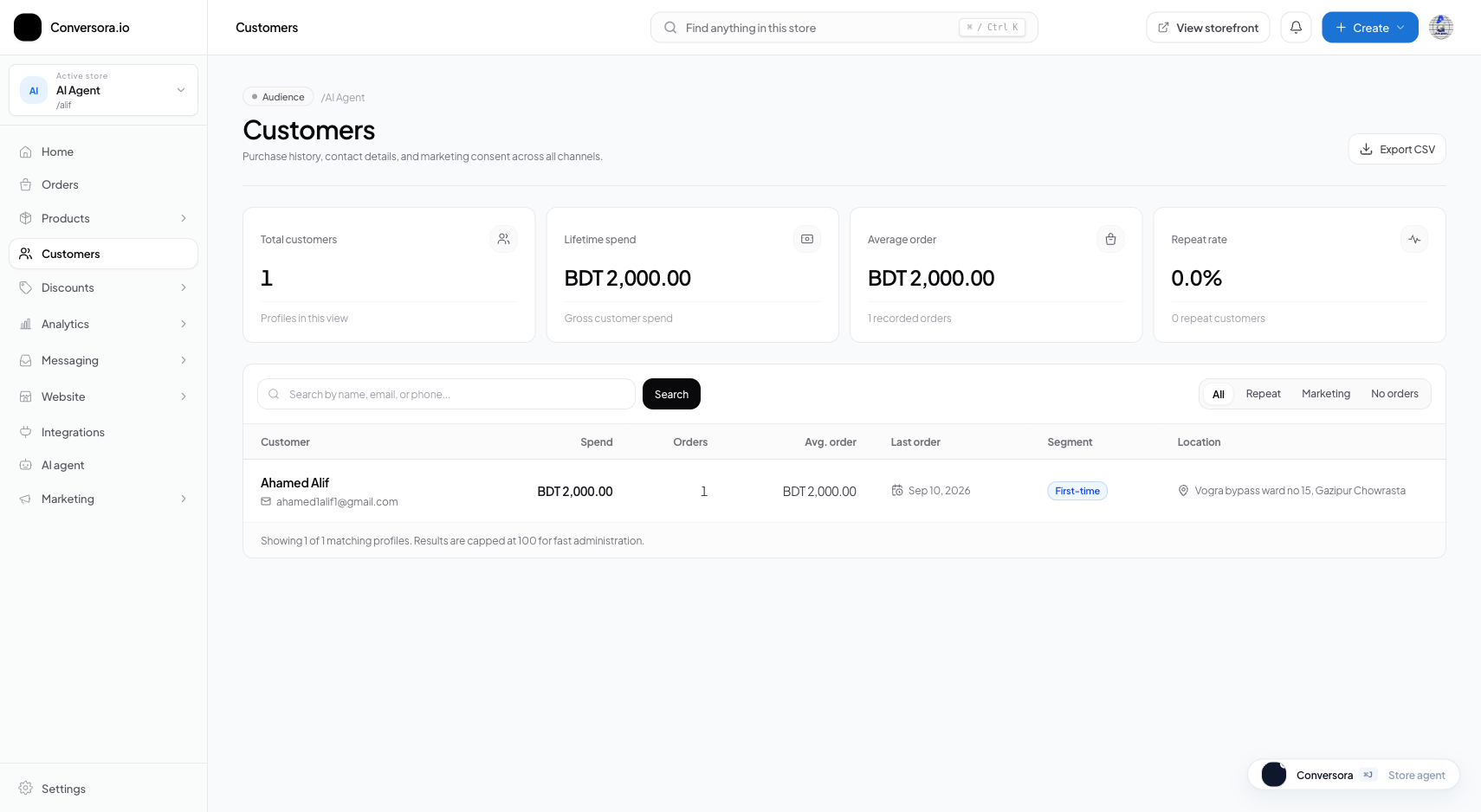
Customers CRM console showing unified shopper directory, lifetime value metrics, acquisition channels, and order counts.
Click to enlarge

Customers CRM console showing unified shopper directory, lifetime value metrics, acquisition channels, and order counts.

Customer 360 View
Consolidated profile linking phone, email, address, and social handles.
LTV & AOV Tracking
Real-time cumulative spend calculation and average basket size metrics.
Automated Segmentation
Smart tags identifying VIP, First-Time, At-Risk, and High Return Risk shoppers.

1. The Single Customer View & Financial Telemetry

Navigating to Customers (/admin/customers/[store]) reveals your complete shopper directory.

Selecting any customer opens their detailed profile drawer displaying: - Contact Information: Full name, primary verified phone number, email address, and saved shipping addresses. - Commercial KPIs: Total completed orders, Net Lifetime Value (LTV), Average Order Value (AOV), and Acquisition Channel (e.g. Instagram DM vs Direct Storefront). - Omnichannel Conversation History: Recent chat threads handled by Aura Bot or your human support staff, allowing you to review promises made to the customer.

2. Strategic Customer Segmentation

Segmenting shoppers enables you to run targeted campaigns and protect your margins:

  • VIP Shoppers: High-spend customers (e.g. cumulative spend > 10,000 BDT). Prioritize their orders, include complimentary promotional gifts, or grant exclusive early access to seasonal collections.
  • First-Time Buyers: Customers who just placed their first order. Send follow-up surveys or welcome discount codes to encourage a second purchase.
  • At-Risk / Lapsed: Shoppers who have not purchased in over 60 days. Re-engage them via targeted SMS or WhatsApp broadcast offers.
  • High Return Risk: Customers with a history of refusing Cash on Delivery parcels upon courier arrival. Require advance shipping charges via bKash before shipping to prevent costly return freight.

3. Adding Internal Notes and Customer Tags

Team members can attach internal operational tags and private notes to any customer profile. These notes are completely private to your staff and are never exposed to the shopper.

1

Open Customer Profile

From the Customers directory, click on the target shopper's row.

Path:Admin Sidebar → Customers → Select Customer
2

Add Strategic Tag

In the Tags section, type a keyword (such as 'Wholesale Buyer', 'Prefers Cotton', or 'Requires Call Before Delivery') and press Enter.

Path:Customer Drawer → Tags Input → Add Tag
3

Save Internal Note

Type your observation in the Merchant Notes box and click 'Save Note'. The note is time-stamped with your staff name.

Path:Customer Drawer → Merchant Notes → Save
Pro Tip

Tagging customer preferences (such as preferred shoe sizes or collar dimensions) allows your Omnichannel Inbox team to provide lightning-fast, tailored recommendations.

Practical Business Scenarios

How leading merchants implement this functionality in daily operations:

Mitigating Cash on Delivery Return Fraud
Situation: A shopper repeatedly places high-value COD orders but cancels when the courier arrives at their doorstep, causing shipping loss.
Best practice: Tag the customer as 'Return Risk'. When they place an order, contact them to request advance payment of the courier fee via bKash before dispatch.
VIP Concierge Shopping
Situation: A high-net-worth customer with over 25,000 BDT in purchases asks for an item currently out of stock.
Best practice: Inspect their profile, confirm their VIP status, and place a priority back-order with the manufacturing team while applying an exclusive VIP discount.

Troubleshooting & Common Issues

Diagnose and resolve frequent failure points quickly:

Problem: A customer placed two orders with different phone numbers and appears twice
Why this occurs: Customer used their personal mobile for one order and an office number for another, resulting in two separate records.
Resolution: Open the primary customer profile, add the secondary phone number to their alternate contact fields, and tag the secondary record as merged.
Problem: Customer's Lifetime Value (LTV) seems lower than actual payments
Why this occurs: LTV only tallies orders in CONFIRMED or DELIVERED status; cancelled or pending draft checkouts are excluded.
Resolution: Verify that all fulfilled orders have been transitioned to CONFIRMED, SHIPPED, or DELIVERED in your Orders workspace.

Frequently Asked Questions

Can I export my customer list to CSV for email marketing?

Yes. In the Customers directory, click 'Export CSV' to download a complete spreadsheet with names, emails, phone numbers, total spend, and tags.

Does the AI employee see customer notes?

Aura Bot references customer tags and historical order preferences when generating personalized chat responses in the Omnichannel Inbox.