Orders, Invoicing & FulfillmentPopularIntermediate

Courier Shipping Rates, Delivery Zones & Local Logistics

Configure delivery zones (Inside Dhaka vs Outside Dhaka), automated shipping rates, and seamless courier integrations with Steadfast, Pathao, and RedX.

6 min readUpdated 2026-09-18
In This Guide
  • Set up custom delivery zones (e.g. Inside City, Suburbs, Nationwide) with tailored flat rates.
  • Connect automated courier APIs (Steadfast, RedX) for one-click parcel booking and tracking generation.
  • Offer Free Shipping thresholds (e.g. Free delivery on orders over 2,000 BDT) to increase average order value.
  • Automate Cash on Delivery (COD) amount collection and courier payment reconciliation.

What This Functionality Does

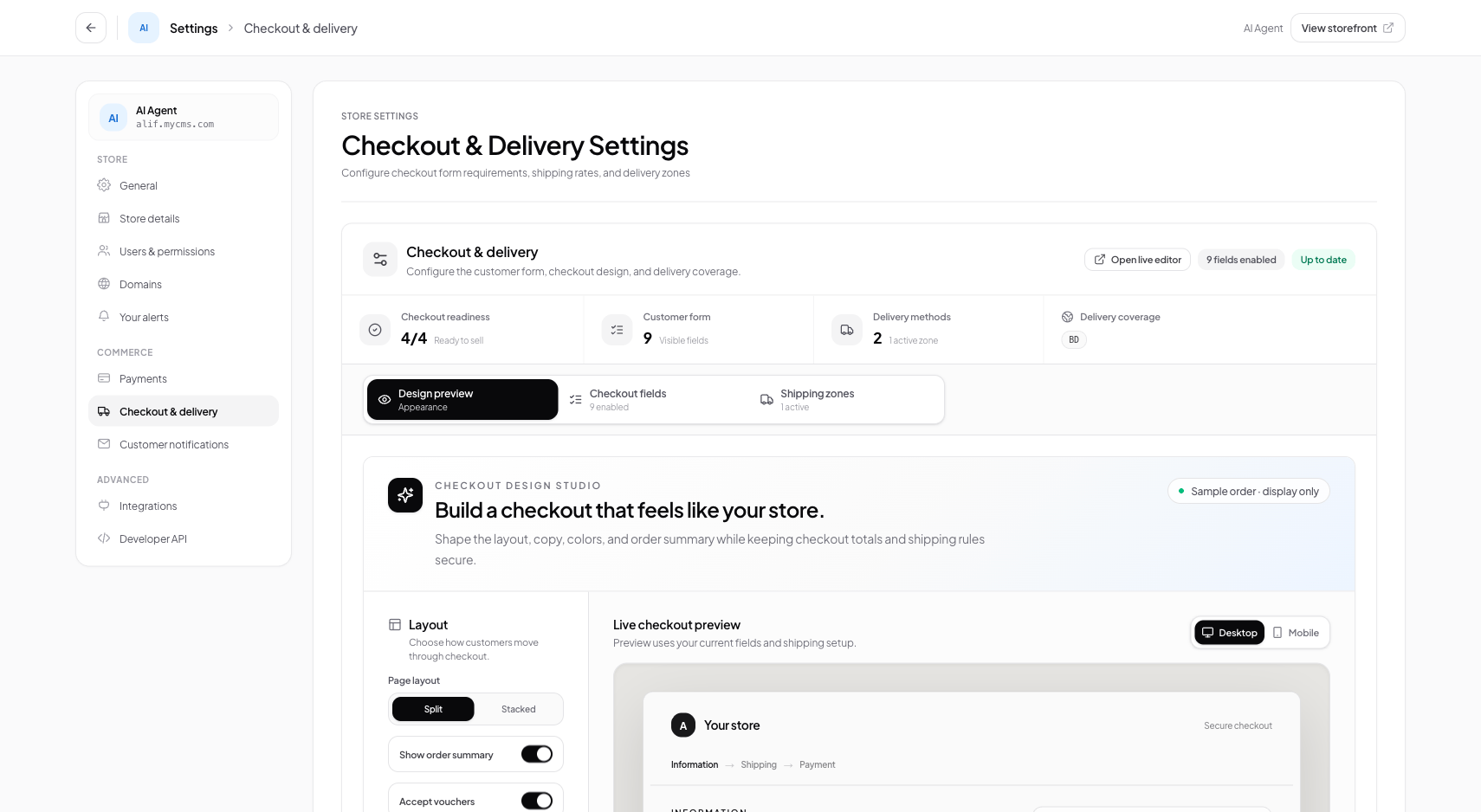
The Checkout & Delivery workspace governs how shipping costs are calculated at checkout and how packages are handed over to third-party courier services.

In regional e-commerce, shipping rates depend on geographic delivery zones: - Metro / Inside Capital: Fast 24–48 hour delivery with lower shipping rates (e.g. 60 BDT). - Outside Metro / Nationwide: 3–5 day delivery with standard courier fees (e.g. 120 BDT). - Free Shipping Incentives: Automatically waive shipping fees when cart totals exceed a specific spending goal, encouraging shoppers to add extra items to their cart.

Connecting integrated couriers (like Steadfast or RedX) eliminates manual parcel entry. With one click, delivery addresses and COD collection amounts are transmitted to the courier's booking system.

How It Works Behind the Scenes

Conversora calculates delivery fees dynamically during checkout and routes consignments via courier REST APIs:

  1. 1Dynamic Rate Evaluation: When a customer enters their delivery address at checkout, the shipping calculator determines their zone based on city, district, or postal code.
  2. 2Free Shipping Rules: If a merchant has configured a free shipping threshold (e.g., cart total >= 2000), the shipping rate drops to 0.00.
  3. 3Automated Courier Consignment API: When the merchant clicks 'Book Courier', Conversora's edge worker makes an authenticated POST request to the courier's API (e.g. Steadfast create_order API) containing recipient name, address, phone, and COD collection amount.
  4. 4Tracking Code Ingestion: The courier returns an official tracking code, which Conversora saves to the order and sends to the customer via SMS/WhatsApp.
Prerequisites

Before configuring this feature, confirm that your store meets the following requirements:
Courier Merchant Account:An active merchant account and API key from a supported courier partner (e.g. Steadfast Courier).

1. Configuring Delivery Zones & Flat Rates

Define geographic shipping zones that match your local courier pricing structure. Most regional retailers establish at least two zones: Inside Capital and Outside Capital.

1

Navigate to Delivery Settings

From the admin menu, select 'Settings' and click 'Checkout & Delivery'.

Path:Admin Sidebar → Settings → Checkout & Delivery
2

Add Shipping Zone

Click '+ Add Zone', enter the zone name (e.g. 'Inside Dhaka'), and set the flat shipping fee (e.g. 60 BDT).

Path:Shipping Zones Panel → Add Zone Modal
3

Set Free Shipping Threshold

Optionally enter a minimum spend threshold (e.g. 2500 BDT) to unlock free delivery for shoppers.

Path:Zone Modal → Free Shipping Threshold

2. Connecting Courier APIs (Steadfast & RedX)

Automate your daily shipping by linking your courier merchant credentials. Once connected, booking parcels takes a single click from the order table.

1

Open Courier Integrations

In the Checkout & Delivery workspace, scroll down to 'Courier Integrations'.

Path:Checkout & Delivery → Courier Integrations
2

Enter API Key & Secret

Select Steadfast or RedX, enter your courier API Key and Secret Key, and click 'Connect'.

Path:Courier Card → API Credentials → Connect
3

Verify Connection

Conversora verifies the credentials with the courier server and displays a green 'Connected' badge.

Path:Courier Card → Status: Active
Pro Tip

Always verify your default pickup warehouse address in courier settings so courier delivery drivers arrive at the correct warehouse location.

Practical Business Scenarios

How leading merchants implement this functionality in daily operations:

High-Volume Flash Sale Shipping
Situation: A store receives 150 orders during a single evening sale and needs to book courier pickups quickly.
Best practice: Select all confirmed orders in the Orders workspace and click 'Bulk Book Courier'. All 150 consignments are registered with Steadfast in seconds, and printable shipping slips are generated immediately.

Troubleshooting & Common Issues

Diagnose and resolve frequent failure points quickly:

Problem: Courier booking returns error: 'Invalid recipient phone number'
Why this occurs: The customer entered a phone number with invalid characters, missing digits, or incorrect regional prefixes.
Resolution: Edit the customer's phone number in Order Details to confirm standard 11-digit formatting (e.g. 017XXXXXXXX) and retry booking.

Frequently Asked Questions

Does Conversora support Cash on Delivery (COD) amount collection?

Yes. The order total (including shipping fees) is automatically transmitted to the courier as the exact COD collection amount.